1:1 Technology: 7 Proven Steps to Successfully Implement It in the Classroom
1:1 technology gives every student a device for learning. Here's a practical, step-by-step guide to rolling it out the right way.
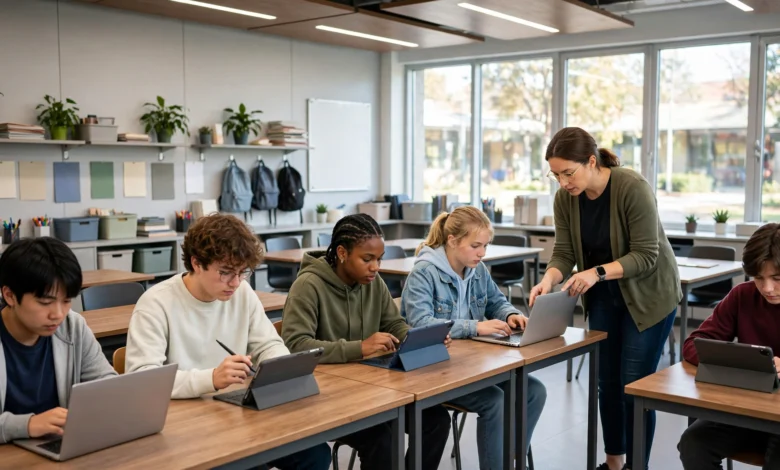
1:1 technology is no longer a nice-to-have for schools. It’s quickly becoming the standard way classrooms operate, whether that means a laptop cart that never gets pushed back into the hallway or a Chromebook that goes home in a student’s backpack every night. But here’s the thing nobody tells you before you sign the purchase order: buying devices is the easy part. Making them actually improve learning is where most 1:1 initiatives stumble.
If you’ve ever sat in a planning meeting where someone says “we’ll just hand out the laptops and figure out the rest later,” you already know how this story usually ends. Devices pile up in a closet, teachers feel unsupported, and the promised gains in student engagement never show up. That’s not a technology problem. It’s an implementation problem.
This guide walks through what actually works when schools move to one-to-one technology, based on research from districts that have been doing this for years (some since the early 2000s) and lessons learned from the ones that got it wrong. You’ll find practical steps for building infrastructure, training staff, setting policies, and keeping the whole program running smoothly once the initial excitement wears off. Whether you’re a classroom teacher trying to make the most of a district-wide rollout or an administrator planning next year’s budget, there’s something here for you.
What Is 1:1 Technology, Exactly?
1:1 technology, sometimes written as one-to-one technology, refers to a model where every student has access to their own personal digital device, usually a laptop, Chromebook, or tablet, for use during class and often at home. It’s different from shared device carts, where a classroom set of laptops gets wheeled in for one period and wheeled out for the next.
The idea sounds simple. Give each kid a device and let them learn at their own pace. In practice, a 1:1 classroom touches almost every part of how a school operates: curriculum design, teacher training, IT support, network capacity, and even how discipline and screen-time policies get written. That’s why schools that treat it as “just buying laptops” tend to struggle, while schools that treat it as a full instructional shift tend to see real results.
Programs in states like Maine and Vermont, some of the earliest adopters of 1:1 learning, have been running for close to two decades now. Their track record offers a lot of useful data on what separates a program that transforms instruction from one that just adds screens to the room.
Why Schools Are Moving Toward One-to-One Technology
Before getting into implementation, it helps to understand why so many districts are making this shift in the first place.
- Personalized learning. When every student has their own device, teachers can assign different reading levels, different practice sets, or different pacing without anyone feeling singled out.
- Digital equity. Students who don’t have reliable technology at home get the same access as everyone else, at least during the school day and often after hours too.
- Real-time collaboration. Shared documents, live polls, and classroom apps let students work together even when they’re not sitting next to each other.
- Career readiness. Comfort with digital tools is no longer optional in most workplaces, so building those habits early pays off later.
- Engagement. Interactive simulations, videos, and games tend to hold student attention better than a textbook and a worksheet, especially for reluctant learners.
None of these benefits happen automatically just because devices are in the room. They happen when the rollout is planned with intention, which brings us to the actual steps.
Step 1: Build the Infrastructure Before the Devices Arrive
It’s tempting to get excited about unboxing a pallet of new laptops, but the unglamorous groundwork matters more than the hardware itself.


Check Your Network Capacity
A school building that can handle 30 devices on Wi-Fi during a pilot program is a very different animal from one that needs to support 800 devices simultaneously streaming video. Before rolling out 1:1 technology at scale, work with your IT team to stress-test the network, upgrade access points where needed, and build in redundancy so one router failure doesn’t take down an entire wing of the building.
Plan for Device Management
Someone needs to own the process of imaging, updating, and repairing devices at scale. Decide early whether you’ll use a mobile device management (MDM) platform, who handles repairs, and what the turnaround time looks like when a student’s screen cracks on a Tuesday morning.
Budget for the Full Lifecycle, Not Just the Purchase
Devices need replacement batteries, charging carts, insurance, and eventually full replacement in three to five years. A common mistake is budgeting for the initial purchase and forgetting that 1:1 programs are an ongoing operating cost, not a one-time expense.
Step 2: Get Buy-In From Teachers Early
A 1:1 technology rollout that arrives as a top-down mandate tends to face quiet resistance. Teachers who weren’t part of the planning process are far less likely to use the devices in meaningful ways, and some may quietly keep teaching the way they always have, laptops or no laptops.
Instead:
- Involve a group of teacher representatives in the planning committee from day one.
- Pilot the program in a handful of classrooms before a full-school launch, and use their feedback to adjust the plan.
- Ask teachers what they’re worried about (classroom management, grading workload, screen time) and address those concerns directly rather than dismissing them.
Teachers who feel heard during planning become the strongest advocates once the devices are actually in students’ hands.
Step 3: Invest Heavily in Professional Development
This is the step schools skip most often, and it’s the one that determines whether the whole initiative succeeds. A best practices review from the Center for Research and Reform in Education makes a point worth repeating: the technology itself isn’t what drives gains in student learning, the quality of the digital instruction built around it is. In other words, handing a teacher a laptop cart doesn’t make them a better teacher. Training does.
A solid professional development plan should include:
- Initial onboarding on the specific devices, apps, and learning management system your school is using.
- Ongoing sessions throughout the year, not just a single day before school starts.
- Peer coaching, where teachers who’ve figured out what works can mentor colleagues who are still adjusting.
- Modeling actual lessons, not just demonstrating features. Teachers need to see what a well-designed 1:1 lesson looks like, not just a list of button clicks.
Frameworks like TPACK (Technological Pedagogical Content Knowledge) are useful here because they remind teachers that good technology use sits at the intersection of what they teach, how they teach it, and the tools available, not just the tools on their own.
Step 4: Set Clear Policies Before You Need Them
Once devices go home with students, questions come up fast. What happens if a student breaks a screen? Can they download their own apps? What websites are blocked? Writing these policies after a problem happens is always harder than writing them before.
Acceptable Use Policies
Spell out expectations clearly, including:
- Staying on task during instructional time
- Only visiting approved websites during class
- No personal email or messaging apps during lessons
- Treating classmates with respect in any shared digital space
Content Filtering and Monitoring
Granular access controls let students reach the resources appropriate for their grade level while keeping them away from content that isn’t. This isn’t about surveillance for its own sake. It’s about making sure the device stays a learning tool rather than a distraction, and it protects students from content they shouldn’t be exposed to in the first place.
Device Care and Responsibility
Decide in advance whether families are responsible for damage, whether there’s an optional insurance fee, and what the loaner process looks like while a device is being repaired. Clarity here prevents a lot of frustrated phone calls later.
Step 5: Redesign Instruction Around Differentiation
The real payoff of 1:1 technology shows up when teachers stop using devices to digitize old worksheets and start using them to personalize instruction.
Some practical ways to do this:
- Assign the same article at different reading levels so every student engages with the same topic at their own level.
- Use adaptive learning platforms that adjust difficulty based on student performance in real time.
- Let students work through content at their own pace, repeating sections they’re struggling with instead of waiting for the whole class to move on.
- Group students dynamically for small-group instruction based on current mastery, rather than fixed ability groups that rarely change.
Edutopia’s research on differentiated instruction has repeatedly pointed to this kind of flexibility as one of the clearest, most consistent benefits of well-implemented classroom technology, precisely because it lets teachers meet a wider range of student needs without multiplying their own workload.
Step 6: Build in Collaboration Tools, Not Just Individual Work
It’s easy to think of 1:1 devices as isolating, each student staring at their own screen. Done well, it’s the opposite. Tools like Google Classroom, shared documents, and classroom-wide discussion boards let students collaborate on group projects in real time, even from different physical locations.
Some ways teachers use this effectively:
- Shared documents where multiple students edit the same project simultaneously and see each other’s changes live
- Digital discussion boards for quieter students who are more comfortable typing a response than raising a hand
- Peer review workflows where students comment directly on each other’s work before final submission
- Class-wide polling tools that give the teacher instant feedback on whether a concept has landed
Step 7: Monitor, Measure, and Adjust
A 1:1 technology program isn’t a one-time event. It’s a living system that needs regular check-ins.
- Survey teachers and students at least once a semester about what’s working and what isn’t.
- Track usage data to see which tools are actually being used and which ones are gathering digital dust.
- Watch engagement and achievement data, not just device uptime, to confirm the program is actually improving learning outcomes.
- Revisit your policies annually, since new apps, new distractions, and new safety concerns show up constantly.
Sustainability is often the hardest part of any 1:1 initiative. The initial rollout gets attention and funding, but the ongoing maintenance, training, and policy updates need a permanent home in the school’s operating budget and staff time, not a one-time grant.
Common Challenges to Plan For
Even a well-planned rollout will hit friction. Being ready for these common issues in advance saves a lot of stress later.
- Distraction and off-task behavior. Devices make it easier for students to drift off task, which is why classroom management strategies need to evolve alongside the technology itself.
- Uneven home internet access. Even with school-issued devices, some students won’t have reliable Wi-Fi at home, so plan for offline access options or hotspot lending programs.
- Teacher fatigue. Learning new tools on top of an already full workload is exhausting. Pace the rollout of new apps and platforms rather than introducing everything at once.
- Repair and replacement delays. A broken device that takes three weeks to fix means three weeks of a student falling behind. Build a loaner pool into your device management plan from the start.
- Equity gaps within the classroom. Some students arrive already comfortable with technology while others need more support. Build in extra onboarding time for students who need it, especially younger learners who are just getting familiar with a keyboard and touchscreen.
Measuring Success Beyond Test Scores
It’s tempting to judge a 1:1 technology program purely by standardized test results, but that’s a narrow lens. Consider tracking:
- Student engagement and participation rates in class
- Attendance and homework completion trends
- Teacher confidence and comfort levels with the tools, measured through simple surveys
- Equity metrics, such as whether device and internet access gaps are actually narrowing
- Qualitative feedback from students about whether they feel more ownership over their learning
The ISTE Standards for Students offer a detailed framework for evaluating whether classroom technology use is genuinely improving instruction rather than just adding novelty. They’re a useful benchmark for districts trying to figure out whether their program is on track or just looks good on paper.
Final Checklist Before You Launch
Before rolling out 1:1 technology school-wide, confirm you’ve covered these basics:
- Network infrastructure has been stress-tested for full-scale device use
- A device management and repair process is in place, including a loaner pool
- Teachers have received initial training and know where to go for ongoing support
- Acceptable use policies and content filtering are documented and communicated to families
- A plan exists for differentiated instruction, not just digitized worksheets
- Collaboration tools are set up and teachers know how to use them
- A feedback and evaluation process is scheduled for the end of the first semester
Conclusion
1:1 technology has the potential to reshape how classrooms operate, giving every student personalized access to instruction, collaboration, and resources that used to be out of reach. But the technology itself isn’t what makes the difference. What matters is the groundwork behind it: solid infrastructure, genuine teacher buy-in, ongoing professional development, clear policies, and a willingness to keep adjusting as the program matures. Schools that treat one-to-one technology as a long-term instructional shift, rather than a one-time purchase, are the ones that see real gains in engagement, equity, and learning outcomes. Get the fundamentals right, and the devices become a genuine tool for better teaching rather than another item gathering dust in a supply closet.



